> ## Documentation Index
> Fetch the complete documentation index at: https://docs.surfacd.com/llms.txt
> Use this file to discover all available pages before exploring further.
# Sharing & Collaboration
> Share view-only access to your dashboards with stakeholders who don't have accounts.
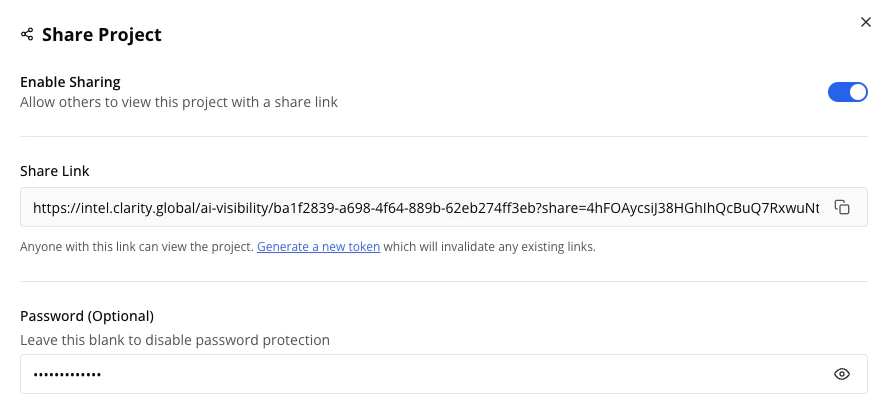 ## Enabling Sharing
1. Open your project and click the **Share** button in the header
2. Toggle **Enable Sharing** on
3. Copy the generated share link
4. Optionally set a **Password** for sensitive data
## What Shared Users Can Access
**Can do:**
* View all analytics (dashboard, rankings, mentions, sources, matrix)
* Use filters and date ranges
* Browse all report tabs
**Cannot do:**
* Edit settings, brands, or prompts
* Request data collection runs
* Export data
* Access other projects
## Managing Access
* **Revoke access:** Toggle sharing off — existing links stop working immediately
* **Generate a new link:** Click **Refresh Token** to create a fresh link and invalidate the old one
* **Set or change password:** Update in the share settings and communicate to stakeholders
* **Remove password:** Leave the password field blank to allow open access via the link
## Tips
Send links and passwords through different channels for added security.
Review sharing settings periodically — disable when no longer needed. Refresh the token if you suspect the link has been shared more widely than intended.
For stakeholders who need to manage projects or export data, invite them as team members instead. See [Team Settings](/docs/team-settings) for role options.
## Enabling Sharing
1. Open your project and click the **Share** button in the header
2. Toggle **Enable Sharing** on
3. Copy the generated share link
4. Optionally set a **Password** for sensitive data
## What Shared Users Can Access
**Can do:**
* View all analytics (dashboard, rankings, mentions, sources, matrix)
* Use filters and date ranges
* Browse all report tabs
**Cannot do:**
* Edit settings, brands, or prompts
* Request data collection runs
* Export data
* Access other projects
## Managing Access
* **Revoke access:** Toggle sharing off — existing links stop working immediately
* **Generate a new link:** Click **Refresh Token** to create a fresh link and invalidate the old one
* **Set or change password:** Update in the share settings and communicate to stakeholders
* **Remove password:** Leave the password field blank to allow open access via the link
## Tips
Send links and passwords through different channels for added security.
Review sharing settings periodically — disable when no longer needed. Refresh the token if you suspect the link has been shared more widely than intended.
For stakeholders who need to manage projects or export data, invite them as team members instead. See [Team Settings](/docs/team-settings) for role options.